What the Declarations Page Actually Is
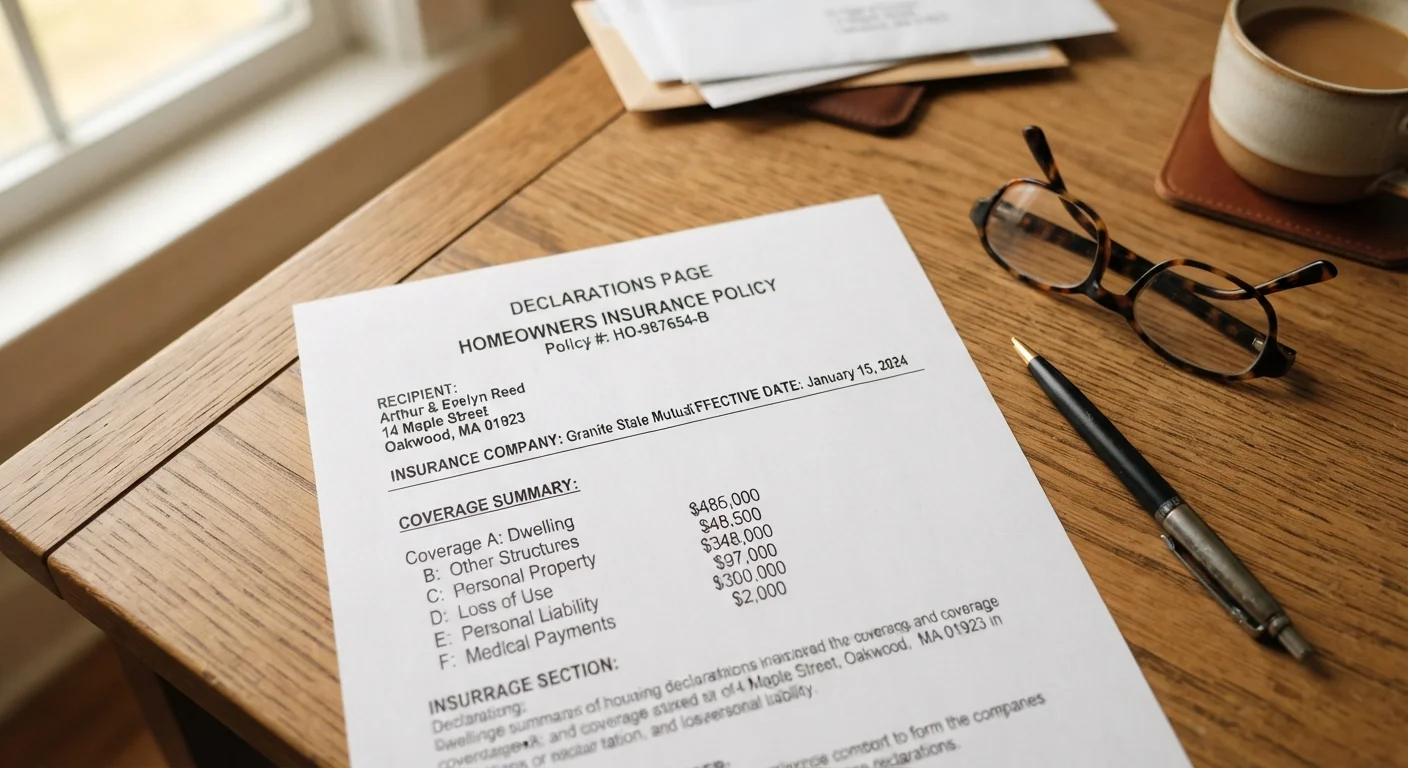
Think of your declarations page as the cover sheet for your entire insurance policy. In one or two pages, it captures the who, what, how much, and how long of your coverage. Insurers are required to provide it, and it travels with every policy — auto, homeowners, renters, and others.
What it is not is the complete contract. The full policy form — often 20 to 40 pages — contains the definitions, conditions, and exclusions that govern exactly how claims are settled. The declarations page points you in the right direction; the policy form fills in the details. For a side-by-side look at how the declarations page fits into the broader policy structure, see The Declarations Page Explained.
The Dec Page Is a Summary, Not the Full Policy
Your declarations page tells you what coverage you have and in what amounts, but the actual terms, conditions, and exclusions live in the policy form itself. Never rely on the declarations page alone to determine whether a specific loss is covered. If you have a claim question, read the relevant coverage section in the full policy or ask your agent directly.
Learning to read your dec page is one of the most practical insurance skills you can develop. Most people only look at it when they are filing a claim — by then, surprises are costly. A few minutes reviewing it at renewal can reveal gaps, errors, or coverage you forgot you were paying for.
How to Read Each Section Step by Step
What you will need
Declarations Page
The primary document you will read and verify during this walkthrough.
Full Policy Document
Used to cross-reference coverage details and exclusions mentioned on the declarations page.
Pen and Highlighter
Mark sections you have questions about or items you need to verify with your agent.
Locate and Identify Your Declarations Page
Your declarations page — commonly called the "dec page" — is typically the first one or two pages of your policy packet. Insurers also send it separately at renewal. If you manage your policy online, log into your insurer's portal and look for a link labeled Policy Summary, Declarations, or Coverage Summary.
Confirm you are looking at the correct policy type (auto vs. homeowners) and the correct policy term dates before you read further.
Verify the Named Insured and Covered Property
The top section identifies the named insured — the person or entity the policy legally belongs to — and the covered property or vehicle. For homeowners policies, this includes your property address. For auto policies, it lists each vehicle by year, make, model, and VIN.
Check that every name, address, and vehicle description is accurate. A misspelled name or wrong address is not just a clerical issue — it can matter during a claim.
Read the Policy Period
Just below the named insured, you will find the policy period — the start and end dates of your coverage. Most policies run for six or twelve months. Coverage does not automatically continue after the end date unless you have renewed.
Note both dates. If you are approaching renewal and have not received a renewal notice, contact your insurer before the policy lapses.
Understand the Coverage Types and Their Limits
This is the core of the declarations page. Each coverage type is listed alongside its limit — the maximum dollar amount the insurer will pay for that category of loss.
- Auto policies typically list: Bodily Injury Liability (per person / per accident), Property Damage Liability, Uninsured/Underinsured Motorist, Comprehensive, and Collision.
- Homeowners policies typically list: Dwelling (Coverage A), Other Structures (Coverage B), Personal Property (Coverage C), Loss of Use (Coverage D), Personal Liability (Coverage E), and Medical Payments (Coverage F).
For a deeper explanation of homeowners coverage categories, see our homeowners insurance terms guide.
Find Your Deductibles
Your deductible is the amount you pay out of pocket before your insurer pays the rest of a covered claim. Deductibles appear alongside the coverages they apply to — often Comprehensive and Collision on auto, and a general deductible (sometimes a separate wind or hurricane deductible) on homeowners policies.
A higher deductible means a lower premium but more out-of-pocket exposure when you file a claim. Confirm your deductible amounts are what you agreed to when you purchased the policy.
Review Endorsements and Exclusions Listed
Endorsements (also called riders) are additions or modifications to your base policy. They appear on the declarations page as line items — for example, a scheduled personal property endorsement for jewelry, or a home business endorsement. Each one adjusts what is covered or excluded.
If an endorsement is listed that you do not recognize, look it up in your full policy or ask your agent. Similarly, if you expected a specific endorsement (like water backup coverage) and do not see it listed, that coverage may not be active. For more on navigating the full policy document, see how to read an insurance policy without getting lost.
Check the Premium Breakdown
The declarations page shows your total premium and often breaks it down by coverage type or billing installment. Review this to confirm the amount matches what you agreed to pay and what is being charged to your payment method.
If you see a surcharge you do not recognize — such as a traffic violation surcharge on an auto policy — contact your insurer to understand the reason. Errors in rating factors can sometimes be corrected.
Save a Copy After Every Renewal
Insurers typically issue a new declarations page each policy term. Keep a digital and a printed copy somewhere accessible — not just in an email folder. If you file a claim, having your dec page on hand speeds up the process considerably. Store it alongside your policy number and your insurer's claims phone number.
Errors Here Can Affect Your Claim
If your declarations page lists the wrong address, an incorrect vehicle identification number, or a named insured who no longer lives in the home, your insurer may have grounds to complicate or reduce a claim. Review this document every time your policy renews — not just when you first buy coverage. Report any inaccuracy to your insurer or agent in writing as soon as you find it.
This article provides general insurance information for educational purposes only and is not personalized insurance, financial, or legal advice. Coverage terms, limits, deductibles, and exclusions vary by insurer, policy, and state. Always read your actual policy documents and consult a licensed insurance agent or adviser for guidance specific to your situation.