

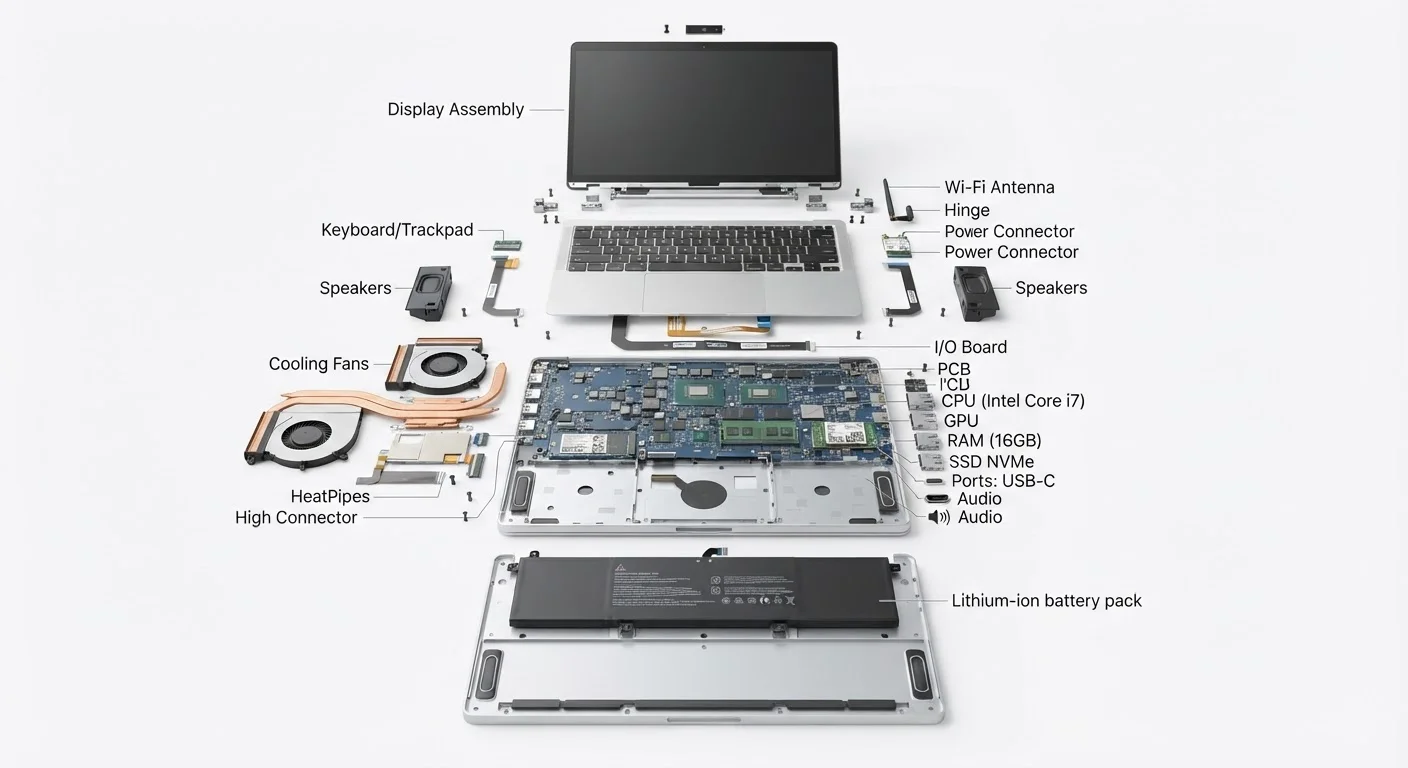
The Building Blocks of Every Laptop
Open up almost any laptop and you'll find the same fundamental collection of components working in concert. Whether you're trying to understand a spec sheet, troubleshoot a slowdown, or simply satisfy your curiosity, knowing what each part does gives you a genuine edge as a consumer. This guide walks through every major piece of laptop hardware in plain language.
| Primary processing unit | CPU (Central Processing Unit) |
| Short-term working memory | RAM — holds active program data |
| Long-term data storage | SSD or HDD — retains files when powered off |
| Graphics rendering | Integrated GPU (shared) or dedicated GPU (separate VRAM) |
| Battery chemistry | Lithium-ion (Li-ion) or Lithium-polymer (LiPo) |
| Component interconnect | Motherboard — links all hardware together |
For a deeper look at how specs translate to real-world performance, see our guide to what PC specs actually mean.
Processing, Memory, and Storage
CPU (Central Processing Unit): Often called the processor, the CPU is the brain of the laptop. It executes instructions from every program you run — from loading a webpage to running a spreadsheet. Clock speed (measured in GHz) and core count both affect how quickly it handles tasks. More cores allow more simultaneous work, which matters for demanding applications.
RAM (Random Access Memory): RAM is your laptop's short-term working memory. It holds the data your CPU is actively using right now — open browser tabs, running applications, active documents. When RAM runs low, the system slows noticeably because it must borrow slower storage space instead. RAM is measured in gigabytes (GB); most everyday tasks run comfortably on 8–16 GB.
Storage Drive: Unlike RAM, storage is long-term. It holds your operating system, applications, and personal files even when the laptop is powered off. Laptops today typically use either a SSD (Solid State Drive) or an older HDD (Hard Disk Drive). SSDs have no moving parts, making them significantly faster and more durable — most modern laptops ship with SSDs as the default.
CPU
Central Processing Unit — the main processor that executes program instructions. Speed is measured in GHz; capacity in number of cores.
RAM
Random Access Memory — fast, temporary storage the CPU uses for active tasks. It is cleared when the laptop powers off.
SSD
Solid State Drive — a storage device with no moving parts that reads and writes data significantly faster than a traditional hard disk drive.
Integrated Graphics
A GPU built into the same chip as the CPU that shares system RAM. Suitable for everyday tasks but less capable than a dedicated GPU for graphics-heavy work.
Motherboard
The main circuit board inside a laptop that physically connects and allows communication between all components.
Heat Pipe
A sealed copper tube containing a working fluid that transfers heat away from the CPU or GPU toward the laptop's cooling fan and exhaust vents.
Watt-hour (Wh)
The unit used to measure laptop battery capacity. A higher watt-hour rating generally indicates a longer potential runtime.
VRAM
Video RAM — dedicated memory on a discrete GPU used to store image, texture, and rendering data. More VRAM supports higher resolutions and more complex visuals.
Display, Graphics, and Input
Display Panel: The screen is made up of a backlit panel — commonly LCD or OLED technology. Key specs include resolution (how many pixels fit on screen), refresh rate (how smoothly motion renders), and panel brightness measured in nits. These directly affect visual clarity and comfort during extended use.
GPU (Graphics Processing Unit): The GPU handles visual rendering. Budget and mid-range laptops typically use integrated graphics — a GPU built into the same chip as the CPU, sharing system RAM. Higher-end machines add a dedicated GPU with its own video memory (VRAM), which is necessary for tasks like video editing, 3D design, or gaming.
Keyboard and Trackpad: These are your primary input devices. Modern keyboards sit above a thin circuit layer that registers keystrokes. The trackpad uses capacitive touch sensors to detect finger movement and gestures — the same underlying technology used in touchscreens. Some laptops also include a touchscreen display as a secondary input method.
Curious how laptop internals compare to what's inside a smartphone? Our plain-language tour of smartphone hardware covers the surprising overlap.
Power, Connectivity, and Cooling
Battery: Laptop batteries are lithium-ion (Li-ion) or lithium-polymer (LiPo) cells. Capacity is rated in watt-hours (Wh) — a higher number generally means longer runtime, though actual battery life depends heavily on the CPU, display brightness, and workload. For a closer look at battery care and common misconceptions, see the truth behind common laptop myths.
Motherboard: The motherboard is the main circuit board that connects every other component. It provides the physical pathways (called buses) through which the CPU, RAM, storage, and GPU all communicate. Everything plugs into or solders onto the motherboard directly.
Ports and Wireless Radios: Ports (USB-A, USB-C, HDMI, headphone jack) are soldered onto the motherboard and let you connect external devices. Internally, a small wireless card handles Wi-Fi and Bluetooth. Higher-spec wireless cards support newer standards like Wi-Fi 6 or Wi-Fi 6E, offering faster and more reliable connections.
Cooling System: Processors generate heat under load. Most laptops manage this with a combination of a metal heat sink (which absorbs heat from the CPU/GPU), copper heat pipes (which carry that heat away), and one or two small fans that exhaust warm air through vents. Thin and fanless laptops may rely on passive cooling alone, which limits sustained performance under heavy workloads.
If you're weighing a laptop against a desktop machine, our article on desktop vs. laptop trade-offs breaks down how these components differ in each form factor.


