

Why It Helps to Know What's Inside Your Phone
Most people interact with their smartphone dozens of times a day without thinking about what makes it work. That's fine — phones are designed to be invisible tools. But when you're comparing two devices, troubleshooting a slow app, or wondering why your battery drains so quickly, a working knowledge of the hardware pays off immediately.
This guide walks through every major component in plain language: what it does, why it exists, and how it affects your day-to-day experience. No engineering background required. If you're new to smartphones in general, you may also want to read our beginner's smartphone guide alongside this one for broader context.
The Processor (SoC): Your Phone's Brain
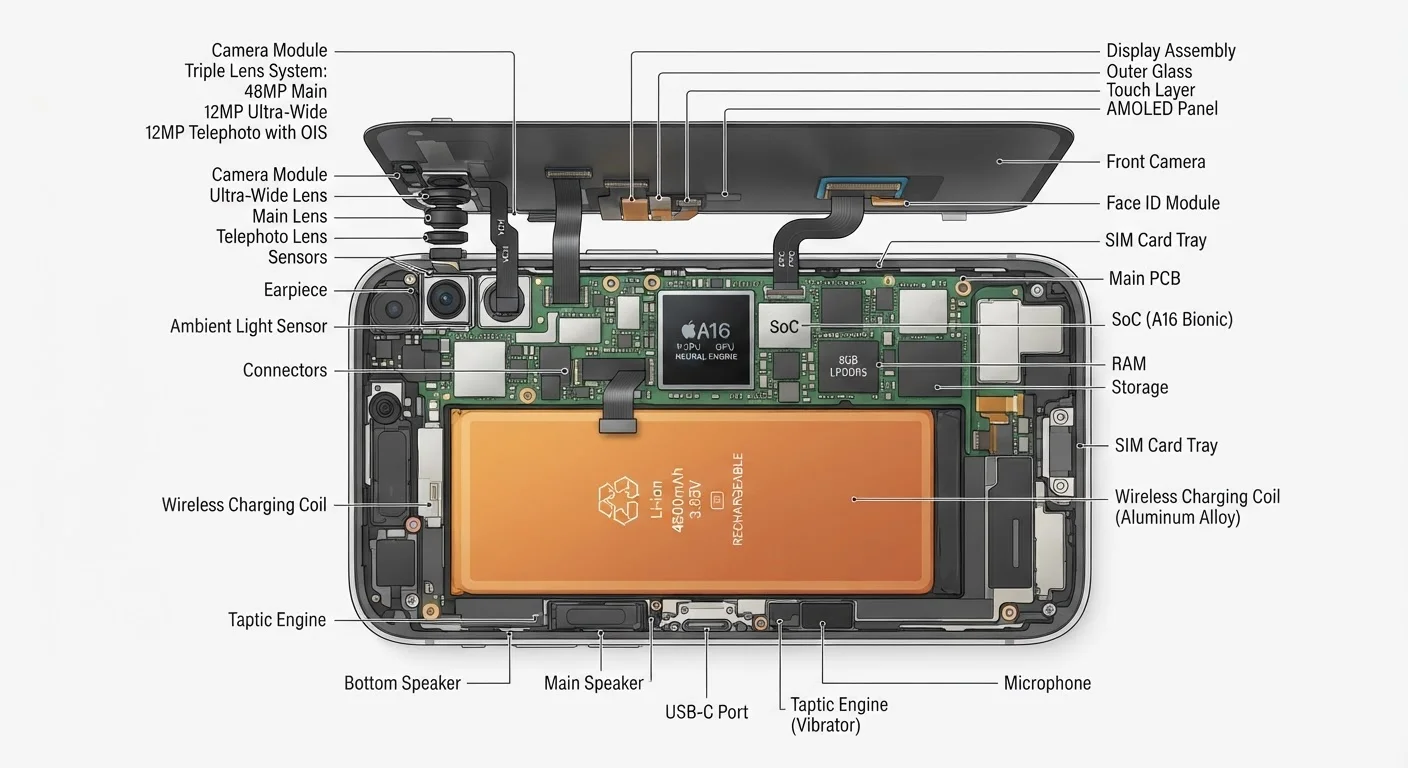
The most important chip in your phone is called a System-on-a-Chip, or SoC. Unlike a desktop computer — where the processor, graphics card, and modem are separate boards — a smartphone SoC crams all of those functions onto a single piece of silicon roughly the size of a thumbnail.
Inside the SoC you'll find:
- CPU (Central Processing Unit): Handles general logic and app execution. Modern phone CPUs have multiple cores — some tuned for demanding tasks, others for background work to conserve battery.
- GPU (Graphics Processing Unit): Renders images, video, and games. It also assists with camera processing.
- NPU (Neural Processing Unit): A specialized engine for AI tasks — think voice recognition, photo scene detection, and real-time translation.
- ISP (Image Signal Processor): Translates raw data from the camera sensor into the polished photo you see on screen.
A faster, more efficient SoC means smoother apps, better photos, and longer battery life — all at once. For a comparison of how mobile processors differ from laptop chips, see our laptop hardware explainer.
When comparing processors, look for third-party benchmark results rather than manufacturer claims — they reveal real-world performance differences that spec sheets often obscure.
Marketing descriptions of chip speed are rarely standardized, making direct comparisons unreliable without independent testing.
If a phone feels sluggish after a software update, clearing cached app data (not the apps themselves) often restores responsiveness without a full factory reset.
App caches accumulate over time and can conflict with updated system processes, a common but underappreciated cause of post-update slowdowns.
RAM and Storage: Two Very Different Kinds of Memory
People often confuse RAM and storage because both are measured in gigabytes, but they serve entirely different purposes.
RAM (Random Access Memory) is your phone's short-term working space. When you open an app, it loads into RAM so the processor can reach it instantly. More RAM means more apps can stay open simultaneously without the system having to reload them from scratch every time you switch. A phone with 4 GB of RAM may stutter when you juggle several apps; one with 8 GB or more handles multitasking more gracefully.
Internal storage is where everything lives permanently — your photos, music, apps, and operating system. Storage doesn't affect speed in the same direct way RAM does, but the type of storage matters. Modern phones use UFS or NVMe flash chips, which transfer data significantly faster than the older eMMC standard found in budget devices.
8 GB
RAM now common in mid-range phones
Industry teardown analyses show 8 GB RAM configurations becoming standard in mid-tier devices as of recent product cycles.
2×
UFS 3.1 vs. eMMC read speed advantage
Storage benchmark comparisons consistently show UFS 3.1 delivering roughly double the sequential read speeds of eMMC 5.1 found in entry-level devices.
For a deeper dive into how these concepts apply to computers as well, our guide on RAM, storage, and processing power covers the fundamentals clearly.
The Battery and Power Management
Smartphone batteries are lithium-ion or lithium-polymer cells — both work on the same electrochemical principle. Capacity is measured in mAh: a higher number means more stored energy, though actual runtime depends heavily on the SoC's efficiency and the display.
Alongside the cell itself, a power management IC (integrated circuit) regulates how energy flows to each component. This chip is responsible for fast charging — it negotiates with the charger to deliver higher wattage safely, then tapers off as the battery fills to protect longevity.
Third-Party Chargers Carry Real Risks
Using uncertified chargers that don't implement proper power negotiation can stress the battery and, in rare cases, create safety hazards. Look for chargers that carry recognized safety certification marks (such as UL or ETL in the US) and are rated to match your phone's charging standard. When in doubt, the charger that came with your phone or one from its manufacturer is the safest starting point.
Battery health degrades gradually over hundreds of charge cycles. Most phones maintain around 80% of original capacity after 500 full cycles, though this varies by usage patterns and charging habits.
Radios: How Your Phone Connects to the World
Your phone is essentially a collection of radios. Each one communicates on a different frequency for a different purpose:
- Cellular modem: Connects to your carrier's network for calls, texts, and mobile data. 5G modems handle multiple frequency bands simultaneously, which is why they consume more power than older 4G LTE modems.
- Wi-Fi radio: Links to your home router or public hotspot. The Wi-Fi standard (Wi-Fi 5, Wi-Fi 6, Wi-Fi 6E) determines maximum throughput and how well the phone handles crowded networks.
- Bluetooth chip: Short-range wireless for headphones, speakers, and accessories. Bluetooth 5.0 and later offers improved range and more stable connections than earlier versions.
- GPS receiver: Listens for signals from navigation satellites. Many phones use assisted GPS, combining satellite data with Wi-Fi and cellular signals to fix your position faster.
- NFC (Near Field Communication): Very short-range radio used for contactless payments and quick device pairing.
All these radios must coexist without interfering with each other — coordinating them is a significant engineering challenge handled by the phone's RF front-end circuitry. To understand how your phone fits into a broader ecosystem of connected devices, see our guide to how home electronics connect.
5G Doesn't Always Mean Faster Speeds
A phone labeled '5G' may connect to low-band 5G frequencies that offer only a modest improvement over 4G LTE in many areas. True high-speed 5G (mid-band or mmWave) depends on your carrier's local network deployment. Check your carrier's coverage map for your area to understand what speeds are realistically available.
Cameras, Sensors, and the Display
Camera system: Modern phones use multiple physical lenses paired with separate image sensors — a main wide sensor, an ultrawide, and often a telephoto. The sensor captures light; the ISP inside the SoC processes that data into a usable image. Larger sensors gather more light, which is why they perform better in dim conditions.
Motion and orientation sensors: The accelerometer detects movement and orientation (whether you're holding the phone upright or sideways). The gyroscope measures rotation more precisely, enabling smooth video stabilization and augmented reality. A barometer, present in many phones, senses air pressure for altitude estimates and weather apps.
Proximity and ambient light sensors: The proximity sensor turns off the display when you hold the phone to your ear. The ambient light sensor automatically adjusts screen brightness to match your environment, saving battery.
Display: The screen is typically an OLED or LCD panel. OLED screens generate their own light per pixel, enabling deep blacks and lower power draw when displaying dark content. Refresh rate — measured in Hz — determines how fluid scrolling and animations feel; 60 Hz is standard, 90–120 Hz is noticeably smoother.
Spec Numbers Don't Tell the Whole Story
A phone with a higher megapixel count doesn't automatically take better photos — sensor size, aperture, and ISP software quality all matter more in practice. Similarly, raw CPU clock speed is a poor predictor of real-world performance when comparing chips from different architecture generations. Always look for real-world reviews and tests alongside the spec sheet.
Understanding these components collectively gives you the vocabulary to evaluate any smartphone specification sheet on its merits — rather than relying on marketing language alone. For more on how consumer electronics work together in your home, explore the Home Tech Basics hub.


