

The HDMI Version Landscape at a Glance
HDMI — short for High-Definition Multimedia Interface — is the single cable that carries both audio and video between devices. The confusion starts when version numbers appear on spec sheets without context. Here's how the major versions stack up.
For most households, the jump from HDMI 1.4 to HDMI 2.0 represented the practical move to 4K streaming. HDMI 2.0 doubled the available bandwidth (to 18 Gbps), making it sufficient for 4K video at 60 frames per second with HDR. If your TV was purchased after roughly 2016 and is labeled 4K, its ports are almost certainly HDMI 2.0 or newer. For a deeper look at what 4K actually means on screen, see our TV resolution explainer.
HDMI 2.1 is where specs get ambitious: 48 Gbps of bandwidth supports 4K at 120 fps, 8K at 60 fps, and features like Variable Refresh Rate (VRR) — mainly relevant for gaming consoles and high-end PC displays. If you own a current-generation gaming console or plan to, HDMI 2.1 on the TV side becomes meaningful. For everything else, 2.0 is typically sufficient.
ARC, eARC, and Why Audio Gets Its Own Label
Separate from bandwidth versions, many HDMI ports carry an additional label: ARC (Audio Return Channel) or eARC (Enhanced Audio Return Channel). These designations describe a specific port's ability to send audio back from the TV to a soundbar or receiver — over the same cable already carrying video in.
HDMI
High-Definition Multimedia Interface — a cable and port standard that carries both audio and video signals between devices like TVs, game consoles, and streaming boxes over a single connection.
Bandwidth (Gbps)
The maximum amount of data a connection can carry per second, measured in gigabits. Higher bandwidth allows higher resolutions, faster frame rates, and more audio detail.
ARC
Audio Return Channel — a feature on designated HDMI ports that lets the TV send audio back to a soundbar or receiver through the same cable carrying the incoming video signal. Supports compressed audio formats only.
eARC
Enhanced Audio Return Channel — an upgraded version of ARC introduced with HDMI 2.1. It supports uncompressed, lossless audio formats and offers significantly more audio bandwidth than standard ARC.
VRR
Variable Refresh Rate — an HDMI 2.1 feature that allows the display to adjust its refresh rate dynamically to match the frame output of a connected device, reducing screen tearing in games.
HDR
High Dynamic Range — a video format that extends the range of brightness and color a display can reproduce. HDMI 2.0 and later support HDR passthrough.
ARC has appeared on TVs since around 2009 and handles compressed audio formats like Dolby Digital 5.1. It works for most soundbar setups, but it cannot carry lossless formats like Dolby TrueHD or DTS-HD Master Audio.
eARC, introduced with the HDMI 2.1 specification, removes that ceiling. It supports uncompressed and lossless audio, meaning a soundbar or AV receiver connected via eARC can reproduce the same audio quality as a Blu-ray disc player connected directly. Critically, eARC also requires only a single HDMI cable and replaces the older optical audio workaround entirely.
One practical note: to use eARC, both the TV and the soundbar or receiver must have eARC-labeled ports, and the HDMI cable connecting them should be a high-speed or Ultra High Speed certified cable. For more on how these connections fit into a full home theater setup, see our soundbar and surround sound guide.
Not Every Port on Your TV Is the Same Version
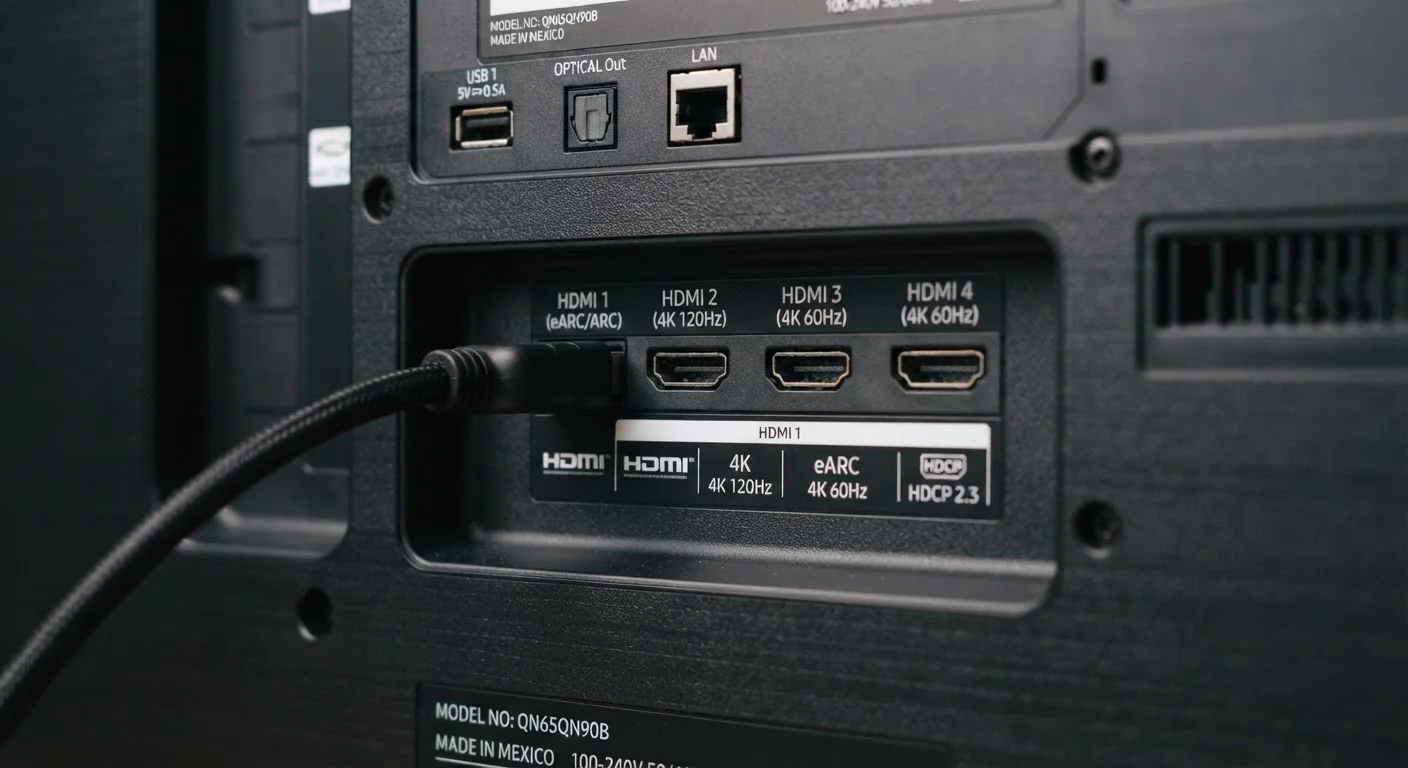
It is common for a TV to have, say, four HDMI ports where only one is labeled eARC or HDMI 2.1. Always check the label printed next to the port itself — or your TV's manual — rather than assuming all ports share the same capabilities. Connecting a soundbar to the wrong port means ARC or eARC simply will not function, even if the TV supports it.
When Version Numbers Actually Matter — and When They Don't
For day-to-day cable TV watching, streaming via a built-in app, or connecting a laptop to a monitor, HDMI version differences are invisible in practice. The signal requirements for those activities sit comfortably within what HDMI 1.4 or 2.0 can handle.
Version matching becomes relevant in three specific scenarios:
- Gaming at high frame rates: Current-generation consoles output 4K/120fps; that requires an HDMI 2.1 port on the display. Connecting via a 2.0 port will work, but the console will step down to 4K/60fps.
- Lossless audio to a soundbar: If your soundbar and content support Dolby TrueHD or DTS-HD, eARC is the path to actually hearing it. ARC will compress the signal.
- Future-proofing for 8K: 8K content is not widely available in the US at this time. HDMI 2.1 supports it, but it is not a practical reason to upgrade existing equipment today.
Understanding how HDMI fits alongside other connection types is useful context — our broader guide on how home electronics connect and communicate covers the full picture. And if you want a port-by-port look at what's on the back of a typical TV, our inputs and outputs guide is a useful companion.
48 Gbps
HDMI 2.1 maximum data bandwidth
According to the HDMI Forum specification, this is nearly 2.7 times the bandwidth available in HDMI 2.0.
37 Mbps
eARC audio channel bandwidth
The HDMI Forum specifies eARC's audio bandwidth as sufficient to carry uncompressed, lossless surround sound formats like Dolby TrueHD.
2009
Year ARC was introduced
ARC debuted with the HDMI 1.4 specification, making it a feature found on many TVs sold over the past decade and a half.


